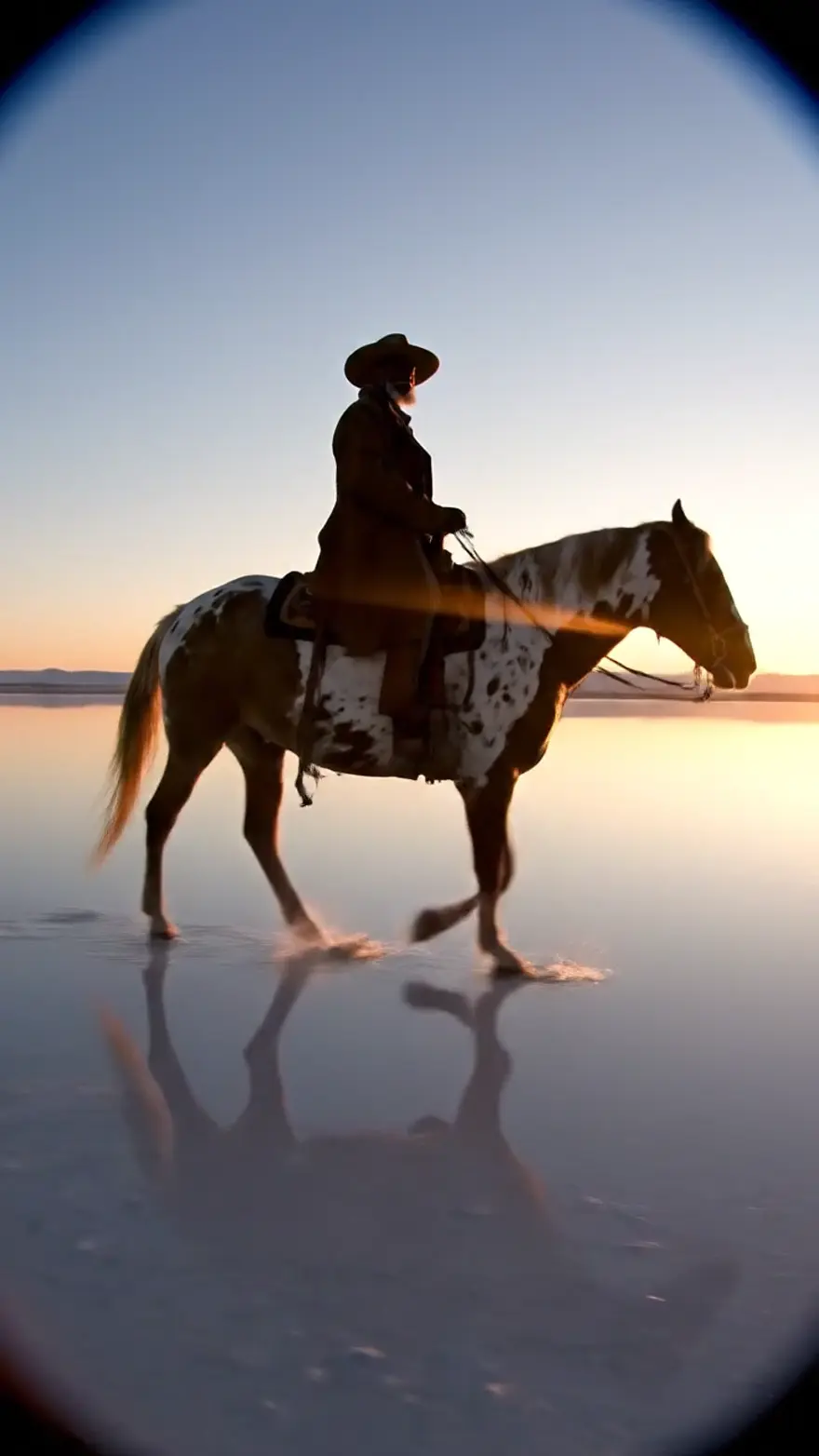

Three video models are worth your attention right now, and they are not interchangeable. Google's Veo 3.1 is the one that makes a shot feel filmed, with dialogue and sound design baked in. ByteDance's Seedance 2.0 is the one that takes references, so the same character, product or motion survives from one clip to the next. Kuaishou's Kling 2.6 Pro is the one that gives you commercial energy at the lowest price of the three.
All three run in the NinjaChat Studio and through the NinjaChat API. Every clip below was generated through NinjaChat's own dispatch code with the exact prompt printed under it. Nothing was cut, upscaled or re-timed.
The short version
| Seedance 2.0 | Veo 3.1 | Kling 2.6 Pro | |
|---|---|---|---|
| Made by | ByteDance | Kuaishou | |
| Pick it for | A character, product or motion you need to keep across clips | The cinematic shot with dialogue and real sound design | Punchy commercial and social clips at the lowest price |
| Sound | Optional native audio, or follow a reference audio clip | Native audio with dialogue and effects | Native audio |
| Reference inputs | Up to four images, a reference video, a reference audio clip | A start image; up to three reference images and first-and-last-frame control in the Studio | A start image |
| Clip length (API) | 4 to 12 seconds | 4, 6 or 8 seconds | 5 or 10 seconds |
| Aspect ratios | 16:9 or 9:16 | 16:9 or 9:16 | 16:9 or 9:16 |
| Output | 1080p | HD, landscape or portrait | HD, landscape or portrait |
| API id | seedance-2 | veo-3.1 | kling-video |
| Price per clip on the NinjaChat API, September 2, 2026 | $3.64 (the 12-second shape) | $3.20 (the 8-second shape) | $1.40 (the 10-second shape) |
Prices are the flat public rates for each model's longest accepted request, passed through from what the provider charges us; the live number is always on each model's developer page (Seedance 2.0, Veo 3.1, Kling 2.6 Pro).
How we compared them
We did not run one identical prompt across all three for this piece. The clips are the attributed showcase runs from each model's NinjaChat page, generated through NinjaChat's own dispatch with the prompts shown, and grouped here by the job you would actually hire a video model for. The prompts are printed in full so you can run your own head-to-head: paste any of them into the Studio and switch the model.
Job 1: commercial energy
The product spot is where most people start, and it is where the models separate fastest.
Kling 2.6 Pro
A sports drink bottle bursts through a wall of ice, shards flying in slow motion, electric blue splash forming a wave behind it, punchy commercial energy
Veo 3.1
Cold brew coffee pours over clear ice in extreme slow motion, amber cascades and caramel swirls, deep rich sound design, premium commercial
Seedance 2.0
A row of tiny robots on an assembly line, each painting one frame of a film strip; the strip runs off the line and comes alive as a moving picture
What to notice: Kling leans into impact and speed, which is exactly what a six-second social ad wants. Veo's pour is slower and more expensive-looking, and the audio is doing real work; you hear the ice. Seedance holds a complex multi-object scene together without any of the robots drifting into each other, which is the property that matters once you start chaining shots.
Job 2: a scene with a story
Veo 3.1
An old lighthouse keeper lights the great lamp as a storm arrives, rain streaking the glass, a small boat's light making it safely home below
Kling 2.6 Pro
POV walking through a neon night market, quick pans across sizzling food stalls, steam and lantern light, energetic vlog style
Seedance 2.0
The wind-up fox toy comes to life: gears whir, it blinks, stretches, and trots forward across the workbench, warm lamp light
The Seedance clip started as a still image of the fox, passed in as a reference. That is the model's whole pitch: you are not describing a fox and hoping, you are handing it the fox. Veo's lighthouse is the most film-like of the three, with weather, a character and a payoff in eight seconds. Kling's POV walk shows how well it handles fast camera moves, which is the thing older models smeared.
Job 3: the impossible shot
Veo 3.1
A ballerina made of golden autumn leaves forms mid-spin and dances, leaves scattering with each turn on a black stage, wind audible
Kling 2.6 Pro
Origami birds fold themselves out of sheet music and fly through a dark concert hall, camera chasing them through a spotlight
Seedance 2.0
Glowing data streams flow between dark server racks and weave themselves into a strip of moving film frames, abstract and precise
All three can do things no camera can. The difference is in what they keep believable while doing it: Veo keeps the physics of the leaves, Kling keeps the camera chase readable, Seedance keeps the abstract geometry precise instead of mushy.
Job 4: keeping things consistent
This is the job that decides which model you build a workflow on.
Seedance 2.0, same fox as Job 2, new scene
The same emerald wind-up fox toy walks carefully along a moonlit bookshelf, past leaning books, tail swaying with each mechanical step
Kling 2.6 Pro, product turntable
A smartwatch rotating in studio light, screen cycling through watch faces, macro detail of the crown clicking, minimal white set
Veo 3.1, wide cinematic frame
A lone rider crosses a mirror-flat salt lake at dawn, perfect reflection below, wide anamorphic framing, hooves echoing in the silence
Seedance is the only one of the three that accepts a reference video and a reference audio clip alongside images, so a character, a camera move and a soundtrack can all be pinned. Veo takes reference images and a first frame, which is enough for most brand work. Kling takes a start image, which is enough for a product spin or animating a still.
What each model does better
Seedance 2.0 wins when the input is not just text. Up to four reference images lock a face, an outfit or a product; a reference video steers the motion; a reference audio clip sets the soundtrack. It outputs 1080p and runs up to 12 seconds through the API. If you are producing a series rather than a one-off, this is the one. Full Seedance guide.
Veo 3.1 wins the single hero shot. Dialogue in quotes comes out as spoken lines, the sound design is part of the render rather than an afterthought, and the motion is the most film-like of the three. It is the model to reach for when one clip has to carry a launch page. Full Veo 3.1 guide.
Kling 2.6 Pro wins on price and pace. At $1.40 for a ten-second clip on our API it is well under half the cost of the other two, it takes fast camera moves well, and it generates native audio. For daily social content and spec ads it is the sensible default. Kling 2.6 Pro in the Studio.
Prompts that get the same results
The prompts above share a shape, and it transfers between models:
- One shot, one subject. "A lone rider crosses a salt lake at dawn" works; a three-scene story in one prompt does not.
- Name the camera. "Wide anamorphic framing", "POV", "macro detail", "camera chasing them": the models respond to lens and movement language.
- Describe the sound if the model makes it. "Hooves echoing in the silence", "deep rich sound design", "wind audible". For Veo, put dialogue in quotation marks and say who says it.
- Give a reference instead of an adjective on Seedance. Attach the product photo rather than describing the product.
- Pick the length for the job. Eight seconds is Veo's sweet spot; Kling snaps to five or ten; Seedance goes to twelve.
Try any of them on a paid plan: open the Studio in video mode, pick a model, paste the prompt.
Calling each model through the API
The same key that serves chat and images submits video jobs. Submit with POST /v1/videos, then poll GET /v1/videos/{id} or register a webhook in the console and get a POST when the clip is ready. Audio is off by default through the API; set generate_audio when you want it.
Seedance 2.0 with reference images, a reference video and audio on:
curl https://www.ninjachat.ai/api/v1/videos \
  -H "Authorization: Bearer $NINJACHAT_API_KEY" \
  -H "Content-Type: application/json" \
  -d '{
    "model": "seedance-2",
    "prompt": "The same emerald wind-up fox toy walks carefully along a moonlit bookshelf, past leaning books, tail swaying with each mechanical step",
    "duration": 8,
    "aspect_ratio": "16:9",
    "reference_images": ["https://example.com/fox-front.webp", "https://example.com/fox-side.webp"],
    "reference_video": "https://example.com/walk-cycle.mp4",
    "generate_audio": true
  }'
Veo 3.1 with a start image and dialogue:
curl https://www.ninjachat.ai/api/v1/videos \
  -H "Authorization: Bearer $NINJACHAT_API_KEY" \
  -H "Content-Type: application/json" \
  -d '{
    "model": "veo-3.1",
    "prompt": "An old lighthouse keeper lights the great lamp as a storm arrives, rain streaking the glass. He says quietly, \"There you are.\"",
    "duration": 8,
    "aspect_ratio": "16:9",
    "image_url": "https://example.com/lighthouse-frame.webp",
    "generate_audio": true
  }'
Kling 2.6 Pro, ten seconds, portrait:
curl https://www.ninjachat.ai/api/v1/videos \
  -H "Authorization: Bearer $NINJACHAT_API_KEY" \
  -H "Content-Type: application/json" \
  -d '{
    "model": "kling-video",
    "prompt": "A sports drink bottle bursts through a wall of ice, shards flying in slow motion, electric blue splash forming a wave behind it, punchy commercial energy",
    "duration": 10,
    "aspect_ratio": "9:16",
    "generate_audio": true
  }'
Then poll:
curl https://www.ninjachat.ai/api/v1/videos/$JOB_ID \
  -H "Authorization: Bearer $NINJACHAT_API_KEY"
The job returns status: "completed" with a video_url you can download or serve directly. Failed jobs are refunded automatically. The full request shape, including end_image_url for seam-locked chaining on the models that support it, is on the API docs and in the OpenAPI spec.
Cheaper siblings
If price decides it, each family has a lighter tier through the API. Veo 3.1 Fast returns a clip in about a minute at $1.20 per clip as of September 2, 2026, and is the right default for volume. Seedance 2.0 Fast and Seedance 2.0 Mini trade a little fidelity for speed and are priced below Seedance 2.0; the live numbers are on the catalog. The Studio's Auto option picks a model for the prompt if you would rather not choose.
FAQ
Which is best overall, Seedance 2.0, Veo 3.1 or Kling 2.6? There is no single winner. Veo 3.1 produces the most film-like single shot with dialogue and sound. Seedance 2.0 is the one to build a series on because it takes image, video and audio references. Kling 2.6 Pro is the best value for punchy social and commercial clips. Most teams end up using two of them.
Do all three generate sound?
Yes. Veo 3.1 generates audio with spoken lines and effects. Seedance 2.0 generates audio when you turn it on, or follows a reference audio clip you supply. Kling 2.6 Pro generates native audio. Through the API, audio is off unless you set generate_audio to true.
Which one takes reference images? Seedance 2.0 takes up to four reference images plus a reference video and a reference audio clip. Veo 3.1 takes a start image through the API and up to three reference images with first-and-last-frame control in the Studio. Kling 2.6 Pro takes a start image.
How long can the clips be? Seedance 2.0 runs 4 to 12 seconds, Veo 3.1 4, 6 or 8 seconds, and Kling 2.6 Pro 5 or 10 seconds. For anything longer, generate one shot per prompt and cut them together; the models are built for single shots.
Can I try them free? Not in the Studio. NinjaChat is our product, and video generation in it needs a paid plan; each plan includes a monthly allowance of video credits. The API runs on a prepaid balance: a phone-verified account starts with a $0.50 starter balance, and a video clip needs a top-up (from $5).
Are these clips edited? No. Each clip is the raw output of the model through NinjaChat's own dispatch code, with the prompt printed beneath it. The only choice we made was which four clips to show per model, and those are the same clips on each model's page.