
Cursor's agent is only as capable as the tools it can reach. Out of the box it reads your repo and edits files. With the right MCP servers connected it opens real browsers, queries your production database, reads your design files, checks your error tracker, and generates the images your project needs — without you leaving the editor.
The problem: every "best MCP servers" list is forty entries long, half are abandoned wrappers, and none of them mention the cost of over-connecting. This list is eight servers, each tested against one question — does the agent finish more of the job with this connected? — with the config, a proving ask, and an honest "skip it if" for each.
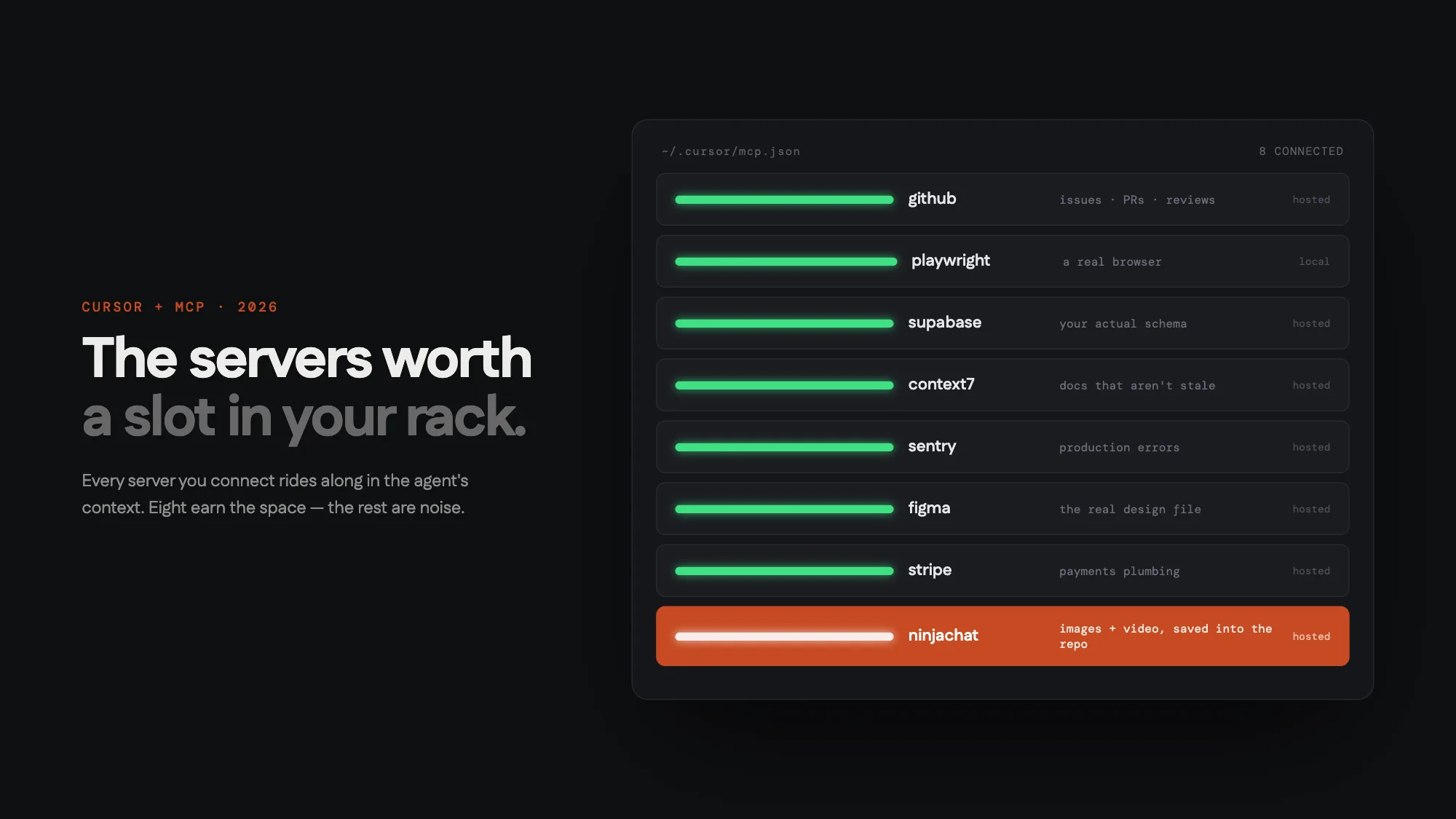
The short version
| Server | What the agent gains | Type | Auth | Skip it if |
|---|---|---|---|---|
| GitHub | issues, PRs, reviews | hosted | OAuth/PAT | you don't work in GitHub |
| Playwright | a real browser | local | none | you never build UI |
| Supabase | your actual DB schema | hosted | token | no database yet |
| Context7 | current library docs | hosted | free key | your stack never changes |
| Sentry | production stack traces | hosted | OAuth | nothing's in production |
| Figma | real design specs | hosted/local | token | no design files |
| Stripe | payments + its docs | hosted | key | no payments |
| NinjaChat | image + video generation | hosted | key | your projects need zero visuals |
Everything below is the detail: what each one actually changes day-to-day, and the exact config.
First, the tax nobody mentions
Every connected server injects its tool schemas into the agent's context on every request. Connect twenty servers and you've spent thousands of tokens before the conversation starts — and given the model twenty ways to pick the wrong tool. Cursor's own guidance caps usable tools at around forty, and many servers expose ten or more each.
So the rule this list is built on: a server earns a slot when its wall shows up weekly. If you hit the wall monthly, connect it for the day and remove it. The eight below are the ones whose walls show up weekly for most people shipping web software.
1. GitHub — stop being the clipboard between Cursor and your repo host
The ask that proves it: "Read issue #142, fix it, and open a PR that references it." The agent reads the thread — including the maintainer comment that changes the fix — writes the change, and opens the PR with a body that links back.
"github": {
  "url": "https://api.githubcopilot.com/mcp/"
}
The hosted server authenticates with OAuth on first use; no PAT pasting. If your team's workflow lives in issues and reviews, this one pays for its context slot the first morning.
Skip it if you're on GitLab (use its MCP server instead) or your repo workflow is just git push.
2. Playwright — the difference between "should work" and "watched it work"
The ask: "Open localhost:3000, add an item to the cart, and tell me what the checkout button actually does." The agent drives a real browser via the accessibility tree — clicks, fills forms, reads what rendered — then fixes what it saw break, not what it guessed might.
"playwright": {
  "command": "npx",
  "args": ["@playwright/mcp@latest"]
}
It's a local server (it needs to own a browser), which means it dies with your session — fine, because you only want it during UI work anyway.
Skip it if you're building CLIs or APIs; curl in the terminal already covers you.
3. Supabase — schema truth instead of schema vibes
The ask: "Why is the feed query slow?" — and the agent looks at the actual table, sees the missing index on created_at, and writes the migration. Without a database server connected, the same question produces confident guesses about columns that don't exist.
"supabase": {
  "url": "https://mcp.supabase.com/mcp"
}
Not on Supabase? The pattern is the category: the official Postgres MCP server, PlanetScale's, Neon's — connect whichever holds your schema. One warning that applies to all of them: scope the credentials read-only unless you specifically want the agent running migrations, and prefer a branch/staging database over production.
Skip it if the project has no database yet — reconnect the day it does.
4. Context7 — because the model's docs are from its training cutoff
The ask: "Add auth with the current version of better-auth" — where "current" is the operative word. Context7 pulls version-specific docs at request time, so the agent writes against the API that exists now, not the one from eighteen months ago. This single server eliminates the most annoying failure mode in agentic coding: plausible code against a renamed API.
"context7": {
  "url": "https://mcp.context7.com/mcp"
}
Skip it if your dependencies are pinned and ancient — the model probably memorized them correctly.
5. Sentry — "fix the top crash from yesterday" as a one-liner
The ask is exactly that. The agent pulls the highest-frequency issue, reads the real stack trace, finds the file, fixes it, and can link the PR to the Sentry issue. Debugging production without leaving the editor is one of those things that sounds incremental and feels enormous.
"sentry": {
  "url": "https://mcp.sentry.dev/mcp"
}
Skip it if nothing's in production yet. The category matters more than the vendor — most error trackers have an MCP server now.
6. Figma — pixel values from the file, not from a screenshot
The ask: "Build this frame" with a Figma link. The agent reads actual spacing, tokens, and layout from the design file instead of eyeballing a screenshot, and first-pass fidelity jumps noticeably. Figma's official server runs in dev mode locally or hosted; the community Framelink server is the lighter alternative.
Skip it if design lives in your head. (No shame, but then there's nothing to read.)
7. Stripe — the forty-tab errand, handled
The ask: "Set up a $29/mo plan with a 14-day trial in test mode, and wire the webhook." Products, prices, webhooks, and — quietly the best part — search over Stripe's actual documentation while doing it.
"stripe": {
  "url": "https://mcp.stripe.com"
}
Use test-mode keys. Obviously.
Skip it if you're not charging money. Yet.
8. NinjaChat — the wall the other seven can't touch
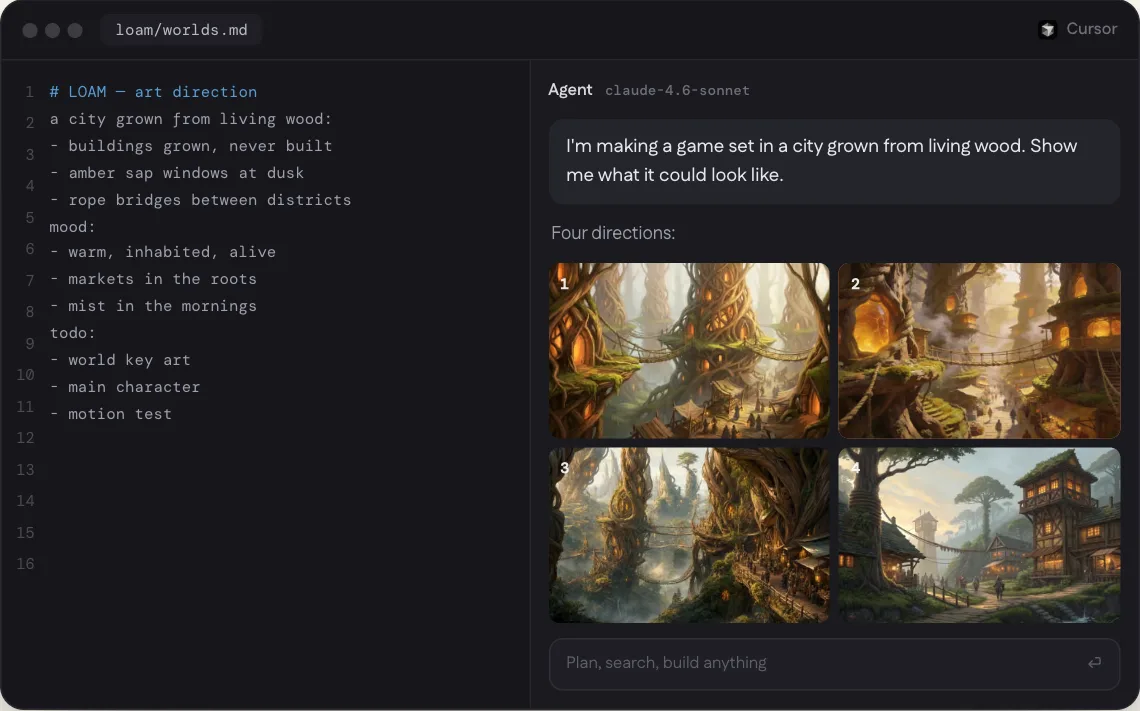
Disclosure first: this one is ours. It's here because after code, verification, data, docs, errors, design, and payments, there's still the wall every project hits last and hates most — the visual one. The hero image. The OG image. Product shots. The README screenshot. The moment where the agent stops and you go stock-photo hunting.
NinjaChat's MCP server is one hosted URL that gives the agent 14 image and video models — Nano Banana Pro, Seedream, GPT Image 2, Recraft, Veo 3.1, Kling — behind plain-language tools. The agent generates what the layout needs, gets a real filename back, and saves it into the repo.
Setup guides for the clients that matter most:
- NinjaChat MCP for Cursor — mcp.json + deeplink install
- NinjaChat MCP for Claude — custom connector / OAuth
- Replicate MCP alternative — flat per-output pricing vs GPU-seconds
"ninjachat": {
  "url": "https://www.ninjachat.ai/api/mcp",
  "headers": { "Authorization": "Bearer nj_sk_YOUR_KEY" }
}
The ask that proves it: "This landing page needs a hero image — something dark and premium. Generate it and wire it up." One pass: image generated, saved to /public, JSX updated.
What makes it rackable rather than a toy: prices are flat and known before each run (images $0.02–$0.13, video from $3.00), failed generations refund automatically, and a monthly spending limit is a hard stop the agent cannot cross. We wrote up the full Cursor walkthrough separately, and a build log where Claude Code shipped an entire product site this way — total image bill $0.48.
Skip it if your projects genuinely never need a visual. (We have not met these projects.)
Recommended stacks
Don't connect all eight on day one. Pick the stack that matches this month's work:
| You're building | Connect | Why this four |
|---|---|---|
| A web app | GitHub · Playwright · Context7 · NinjaChat | code flow, verification, fresh docs, visuals |
| A data-heavy product | GitHub · Supabase · Sentry · Context7 | schema truth + production truth |
| A landing page / launch | Playwright · Figma · NinjaChat · Stripe | design in, visuals generated, payments live |
Rotate servers in when their wall becomes weekly. Rotate them out when it stops.
FAQ
What is an MCP server, in one sentence? A small service that exposes tools (open a browser, query a database, generate an image) which Cursor's agent can call mid-task — MCP is the protocol; think port, not framework.
How many MCP servers should I connect in Cursor? Four to eight well-chosen ones. Past that you're paying context for tools the agent rarely picks correctly. Quality of curation beats quantity every time.
Hosted or local servers? Hosted when offered — nothing to babysit, nothing that dies with your terminal. Local only when the server needs your machine (Playwright needs a browser; filesystem servers need your disk).
Are MCP servers safe to connect? Treat them like dependencies: prefer official servers, read what tools they expose, scope credentials to the minimum (read-only DB access, test-mode Stripe keys), and remember that anything a tool returns enters the agent's context.
Do these work outside Cursor? Almost all of them — the same servers connect to Claude, Claude Code, ChatGPT, Codex, and VS Code with config-syntax changes only. That's rather the point of a protocol.
If the visual wall is the one you hit most, start here: